How WebRTC streaming works in Security Center SaaS
2026-09-18Last updated
Security Center SaaS web clients can use WebRTC to stream video directly through
peer-to-peer connections. This applies to Genetec Cloudlink™ appliances and supported
direct-to-cloud cameras.
Network requirements
Accessing a WebRTC stream requires the following network conditions:
A WebRTC stream must be accessible from the appliance or camera. If the WebRTC stream
can’t be established, Security Center SaaS web clients use the default HTTPS stream
provided by Security Center SaaS.
The web browser that hosts the applications must be on the same network as the
appliances or cameras. Otherwise, they must connect through a TURN server that is on
both networks' allowlists.
Port requirements must be met for direct-to-cloud cameras and appliances.
How Security Center SaaS establishes WebRTC connections
Security Center SaaS establishes the initial peer-to-peer connection in the cloud through
the following:
Security Center SaaS serves as a signaling server to exchange connection details, such
as Session Description Protocol (SDP) or Interactive Connectivity Establishment (ICE)
candidates.
Session Traversal Utilities for NAT (STUN) and Traversal Using Relays around NAT
(TURN) servers are used to navigate Network Address Translation (NAT) and
firewalls.
WebRTC stream availability
Security Center SaaS can only receive one WebRTC stream from a camera or appliance. The
first user to connect to a camera receives the direct WebRTC stream. Subsequent users
receive the default stream from Security Center SaaS.
Security Center SaaS web clients must be online to establish a WebRTC connection. Offline
local streaming is not supported.
Verifying if a stream uses WebRTC
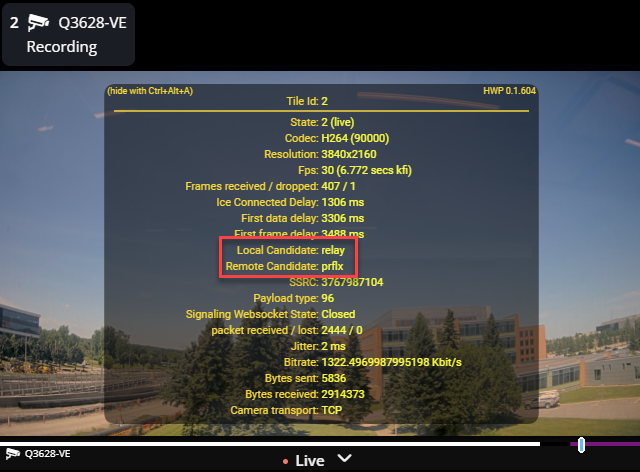
To verify if you are viewing a WebRTC stream, open the diagnostics overlay in the video
tile by selecting the tile and clicking Ctrl+Shift+A. If the Local
Candidate and Remote Candidate lines are displayed in
the diagnostics overlay, the stream uses WebRTC.
The terms associated with the local and remote candidates indicate the stream
routing.
Table 1. Stream routing behavior
Term
WebRTC routing
Host
Direct peer-to-peer streaming
srflx or prflx
Peer-to-peer streaming through NAT traversal
Relay
Redirected streaming through a TURN server
For a list of direct-to-cloud cameras that support WebRTC, see the Security Center SaaS
Supported Device List.