2026-09-29Last updated
If the privileges of a pre-configured role don't meet a user's needs, you can adjust
their privileges in Genetec™ Configuration.
What you should know
- Users are granted a basic set of privileges by the role they are assigned when their
profile is created. They also inherit privileges from their parent user groups.
- Users also have a set of privileges for every partition in which they are an authorized
user. Privileges granted or denied at the partition level replace the basic privileges.
These can be different for each partition the user has access to.
- Individual users should only have the minimum required privileges. Use user groups to
manage more powerful privileges.
Procedure
-
In Configuration, click .
-
Select the user or group to configure, and click the
Privileges tab.
-
(Optional) Configure the user-level privilege settings:
- Allow
- Grant the privilege to the user. If the privilege is denied to the parent user
group, this option is unavailable.
- Deny
- Deny the privilege to the user.
- Undefined
- Inherit this privilege from the parent user group. If there isn’t a parent user
group, this privilege is denied.
-
(Optional) Configure the privilege exceptions for each partition that the user has
access to:
-
At the bottom of the page, click Exceptions (
 ).
).
-
In the Create an exception for list, select a
partition.
-
Change the user's basic privileges as required.
-
Click Create.
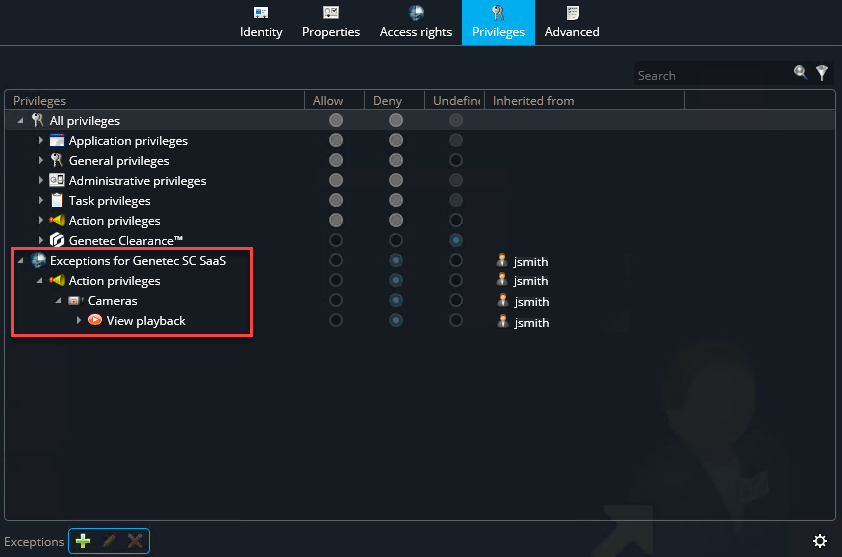
The privilege exceptions are added at the bottom of the privilege
list.
-
(Optional) To allow the user to move entities between partitions they can access
without granting them the full Add/Delete <entities> privileges, enable the
following setting:
-
Click the Advanced tab.
-
In the Security section, enable the Manage
partition memberships option.
If necessary, switch Inherit from parent to
Override to change this setting.
-
Click Apply.
Note: When you grant All privileges to a user, the Manage
partition memberships option is also enabled. However, if you disable the
Manage partition memberships option, it doesn’t affect the
other privileges the user has.
-
Click Apply.