Transferring existing users to your new corporate SSO login service

2026-06-01Last updated

After setting up your corporate identity provider, existing users must complete a one-time transfer to the new login service.

Before you begin

Integrate your corporate identity provider with Security Center SaaS:

What you should know

After registering a new corporate identity provider with login.genetec.com, users who have already created accounts on Security Center SaaS using emails from the corporate domain must complete a login service migration the next time they log in. After completing the migration, users must always log in using their identity on the corporate identity provider.

Procedure

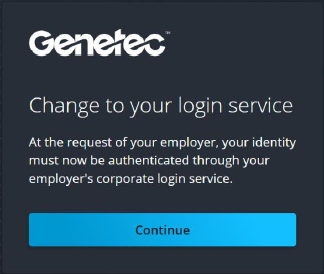
  1. Confirm the change to your login service and click Continue.
    After completing the corporate identity provider registration, the change is confirmed during the user's first sign-in:
    Change to your login service dialog in Genetec Login.
  2. Sign in to your corporate identity provider.
    After the corporate login succeeds, a verification code is sent to the email initially used to set up a password with Genetec.
  3. To confirm your identity, enter your code and click Verify code.
    Verify your identity dialog in Genetec Login.
    A message confirms that the code was successfully verified.
    Login service successfully changed dialog in Genetec Login.
  4. To confirm the login service change, click Continue.
Your account is transferred to your new login service. You can now use your corporate identity provider for single sign-on (SSO) login authentication.
Note:
Corporate SSO is effective not only for your users' logins on Security Center SaaS, but also for most Genetec online services and cloud products:
  • Genetec ClearID™
  • Genetec Clearance™
  • Genetec Cloudrunner™
  • Genetec Operations Center
  • Genetec Portal (genetec.com)