
About watchlists
In Genetec ClearID™, watchlists screen visitors by name or company details. They can block or notify at site or global level, and are managed by watchlist managers.
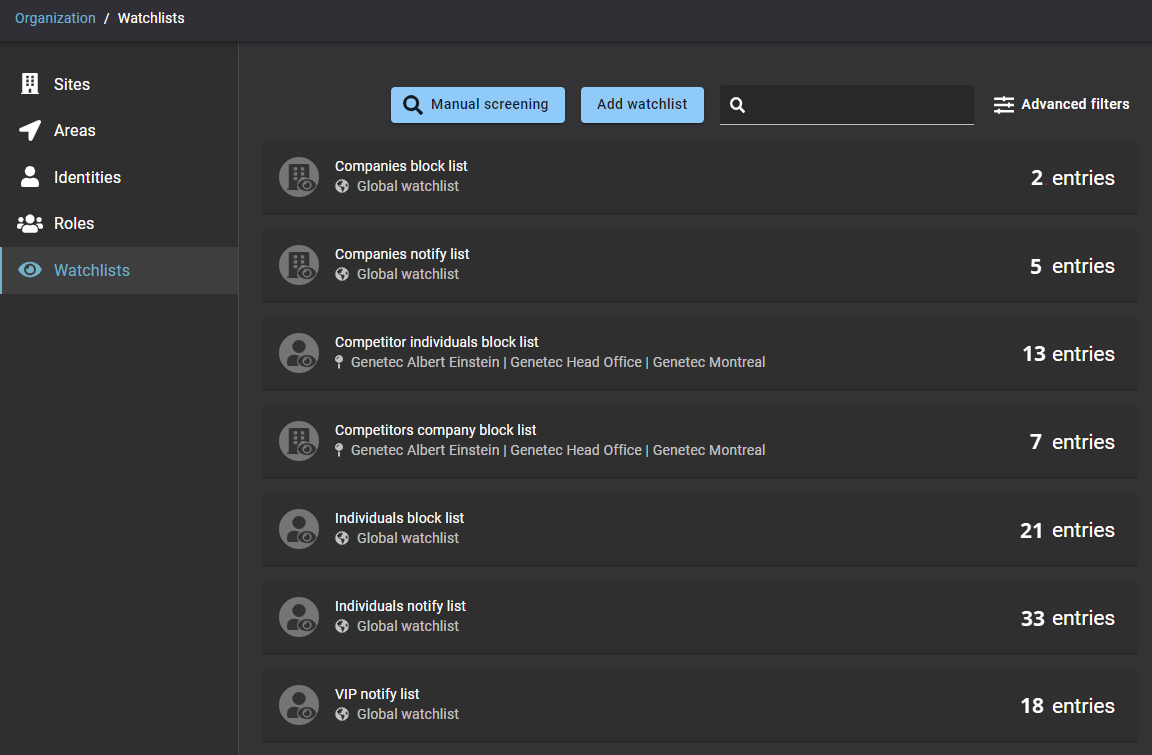
- Individuals: There is a First name and Last name match, First name and Last name alias match, or Email address match.
- Companies: There is a Company name, company domain, or email address domain match.
- Individuals watchlist
- Companies watchlist
 An
Individuals watchlist is used to monitor visitor check-ins for
persons of interest listed in a watchlist and then take action as specified in the
watchlist configuration. For example, you might create an individuals watchlist to
automatically block visitors listed in a watchlist and notify watchlist managers. For other
situations, you might only notify watchlist managers. You might also create an individuals
watchlist to notify all watchlist managers when VIPs check-in at your site.
An
Individuals watchlist is used to monitor visitor check-ins for
persons of interest listed in a watchlist and then take action as specified in the
watchlist configuration. For example, you might create an individuals watchlist to
automatically block visitors listed in a watchlist and notify watchlist managers. For other
situations, you might only notify watchlist managers. You might also create an individuals
watchlist to notify all watchlist managers when VIPs check-in at your site.
 A Companies watchlist is used to monitor visitor
check-ins for companies of interest listed in a watchlist and then take action as
specified in the watchlist configuration. For example, you might create a companies
watchlist to automatically block access for people with a Company
name, company domain, or email address domain that matches specific companies of interest
listed in this watchlist.
A Companies watchlist is used to monitor visitor
check-ins for companies of interest listed in a watchlist and then take action as
specified in the watchlist configuration. For example, you might create a companies
watchlist to automatically block access for people with a Company
name, company domain, or email address domain that matches specific companies of interest
listed in this watchlist.
Watchlist behavior
- Notify watchlist managers.
- Automatically block visitors listed in a watchlist and notify watchlist managers.
Global watchlists
 ) in the watchlist view as follows:
Site watchlists
If a watchlist is not configured as a global watchlist, it’s considered a site-level watchlist and can be applied to one or more sites.
 ), followed by one or more sites, in
the watchlist view as follows:
), followed by one or more sites, in
the watchlist view as follows:
Reasons to block or notify
- Serious criminal records by Government agency
- Violent activity or threats
- False Credentials
- Contraband items
- Theft
- Safety violation
- Other reasons