
How intrusion detection works
2026-10-06Last updated
Learn how Security Center SaaS communicates with intrusion panels and how the integration components exchange events and commands.
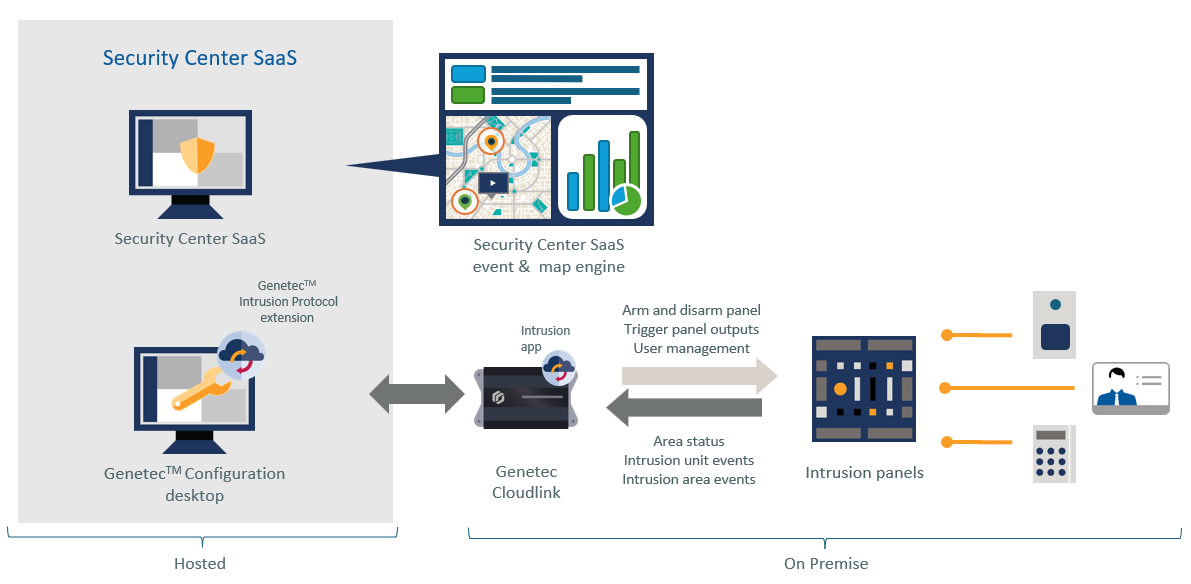
Intrusion detection integration components
- Security Center SaaS
- Security Center SaaS enables administrators to add intrusion panels on the Devices page in the Configuration task. Users can then monitor intrusion areas, inputs, and outputs, generate reports of intrusion events, and review video of intrusion events in monitoring tiles.
- Genetec™ Configuration
- The Intrusion detection task in the Genetec™ Configuration is used to configure and manage intrusion panels.
- Genetec™ Intrusion Protocol extension
- The Genetec Intrusion Protocol extension is part of the Intrusion role in Security Center SaaS. It securely connects Security Center SaaS to the Intrusion app on Genetec Cloudlink appliances.
- Genetec Cloudlink
- The Genetec Cloudlink connects to intrusion panels by Ethernet cable and hosts the Intrusion app.
- Intrusion app
- The Intrusion app includes a Genetec™ Intrusion Bridge, which connects intrusion panels to Security Center SaaS and relays events and commands.
- Intrusion panels
- Intrusion panels monitor and manage security zones, detect unauthorized access, and trigger alarms or events based on configured rules.