Configuring a Qscan barcode reader to support 40-bit hexadecimal QR codes
2024-07-02Last updated
Before the QR codes automatically generated by Genetec ClearID™ for visitor confirmation email notifications can be understood and processed by Synergis™ Cloud Link during check-in, you must configure your Qscan barcode reader to support 40-bit hexadecimal QR codes.
Before you begin
Warning:
Do not look directly into the Qscan barcode reader
or the laser might cause permanent vision damage.
What you should know
In this scenario, we describe how to program Qscan devices to support 40-bit hexadecimal QR codes used in ClearID and output to Synergis Cloud Link.
For example, a QR code when scanned by
Qscan is typically read as alphanumerics ABC1234567.
Synergis Cloud Link requires the QR code in HEX format
0xAB 0xC1 0x23 0x45
               0x67
to manage access requests.CAUTION:
The steps described in
the following process remove alphanumeric QR code support from the Qscan barcode
reader. The Qscan barcode reader can’t be used in alphanumeric mode while the 40-bit
hexadecimal mode is active.
Procedure
-
To reset to factory default settings, scan the qscan resetbarcode1.pdf
barcode.
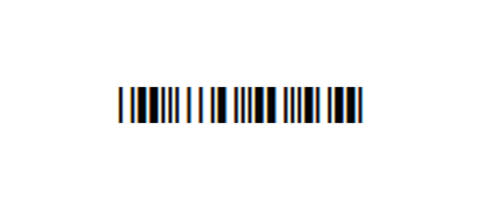 Note:The Qscan reader beeps twice if the factory reset is successful.
 -
To ignore alphanumeric characters, scan the qscan no alpha delete.pdf
barcode.
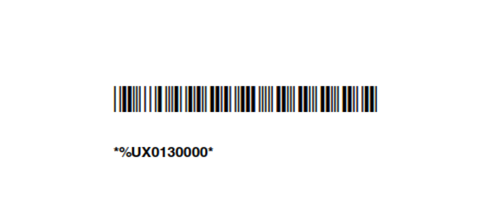
-
To turn HEX conversion on, scan the qscan hex conversion.pdf barcode.
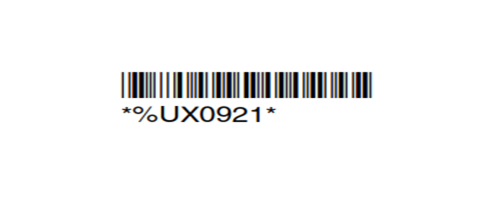
-
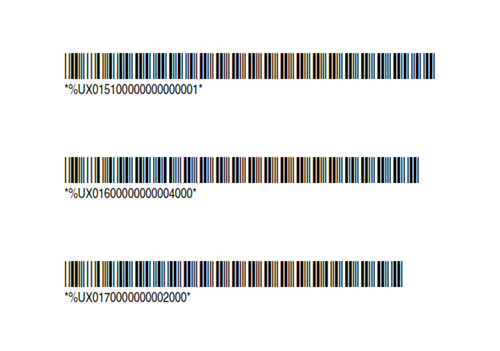
To output 40-bits, scan the qscan 40-bit.pdf barcodes.
Note:This file has three barcodes so scan one at a time.