2026-09-29Last updated
To easily identify inputs on a map, you can assign a custom icon to an input
type.
Before you begin
Make sure the icon file is available on your local
workstation.
Procedure
-
In Genetec™ Configuration, open the Intrusion detection
task.
-
In the entity browser, click the Intrusion role.
-
Click the Input definitions tab.
-
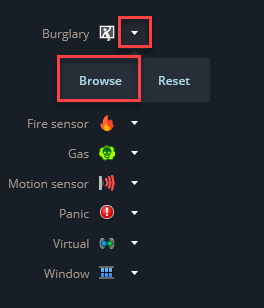
Click the drop down arrow beside an input type and select
Browse.
-
Select an icon from your local files and click Open.
-
Click Apply.
The selected icon is assigned to the input type and appears on
maps that display that input.