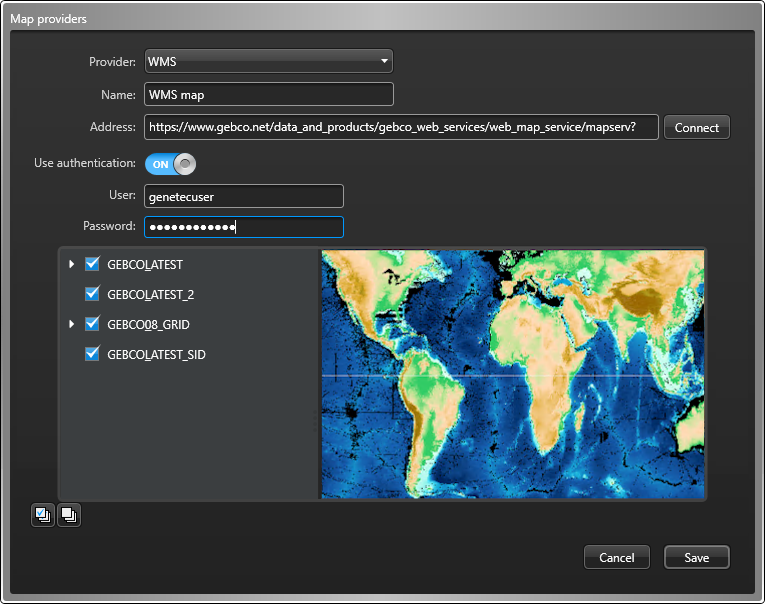
Before you can create maps that use layers from a WMS server, you must set up a map
provider and select the layers to use.
What you should know
The Web Map Service (WMS) standard separates maps into one or more layers of
georeferenced information. When connecting the Map Manager to a WMS server, layers can be
enabled or disabled to control what the map displays.
Map Manager supports the WMS protocol
version 1.3.0 and 1.1.1.
Important:
The Map Manager requires WMS maps to use
EPSG:4326.
Procedure
From the Configuration desktop homepage, open the System task, and
click Roles.
From the entity browser, select Map Manager, and click the
Properties tab.
In the Map providers section, click Add an
item ().
In the Map providers dialog box, select WMS
from the Provider drop-down list.
In the Name field, type a name for the map provider.
In the Address field, type the base URL of the map server.
If the server requires authentication, turn Use authentication
on and enter the username and password.
Server capabilities are discovered
automatically.
Click Connect.
If you entered a valid URL, a preview of the selected map and a list of
available layers is displayed. All layers are selected by default.
If required, clear the layers that you do not need.

 ).
).