Event data
Event data is the contextual information that accompanies every event. It can be used to add conditions to automation triggers and to contextualize automation responses. Different types of data are available depending on the type of event.
Event source data
The event source (source entity) corresponds to the origin of the event. It is available for most event types.
Event data as variables
 button is visible, you can use variables to reference event data such as:
{Source.Id}: The unique identifier (GUID) of the source entity.{Source.Name}: The name of the source entity.{SourceDescription}: The description of the source entity.{EventDescription}: The message that accompanies the event. The included data varies depending on the event type.
Event location data
The event location is only available for certain event types, such as events associated to a Patroller unit, or events associated to a record type (Record updated and Record fusion events, for example).
Event data for access control events
Most access control events have three types of available data:
- Doors
- Cardholders
- Credentials
 ) or an access point (
 ), but you can add cardholders and credentials as conditions.
Event data for ALPR events
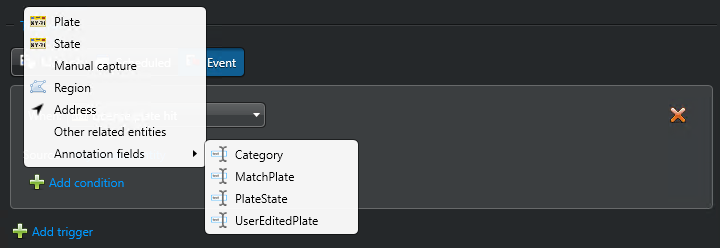
For more information, see Adding conditions when creating event-to-actions for license plate reads.
Event data for camera and custom events
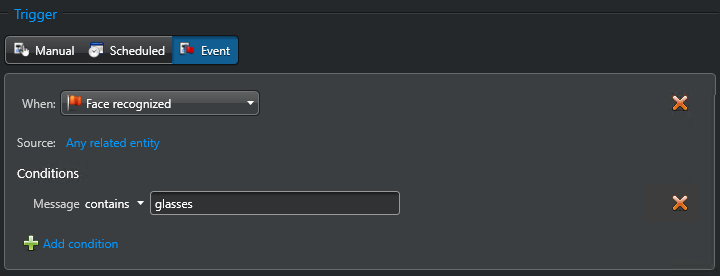
Camera, video analytics, and custom events treat event data as a text message, instead of being exposed as specific conditions.
You can evaluate the event data with the Message condition using the following operators:
equal tonot equal tocontainsstarts withends withinnot insimilar tonot similar toevaluates to
For more information, see Special operators for event conditions.
Except for the evaluates to operator, all other operators assume that the
event data (Message) contains a single value.