Contextualized actions

2026-03-11Last updated

For event‑based automations, you can use data from the triggering event to contextualize the response actions. With contextualized actions, a single automation can handle multiple automation scenarios.

Referencing the source entity

The following actions can reference the source entity of the event that triggered the automation:
  • Applies to all entities:
    • Share entities
  • Applies to areas:
    • Unlock area perimeter doors explicitly
  • Applies to cameras:
    • Add a bookmark
    • Block and unblock video
    • Start recording
    • Stop recording
    • Email snapshots
    • Override with event recording quality
    • Override with manual recording quality
    • Recording quality as standard configuration
  • Applies to cardholders:
    • Forgive an antipassback violation
  • Applies to doors:
    • Silence a buzzer
    • Sound a buzzer
    • Unlock a door explicitly
    • Set the door maintenance mode
  • Applies to doors and elevators:
    • Shunt a reader
  • Applies to units:
    • Reboot a unit
    • Set the entity maintenance mode
The argument that you can contextualize is often shown with a switch between the following two options:
Source
Use the source entity that raised the event.
Specific
Select specific entities based on the action type.
Referencing the source entity when selecting specific entities.

For certain action types, such as Share entities, you have additional options:

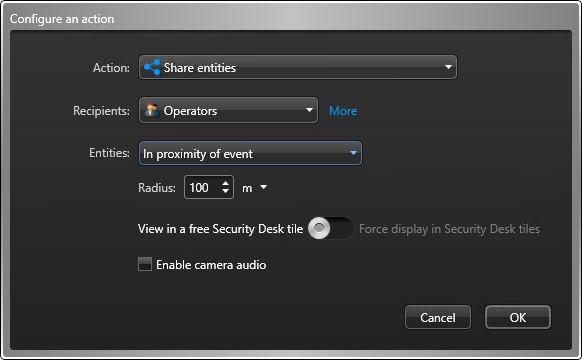
Configuring the "Share entities" action with the "In proximity of event" option.
In proximity of event
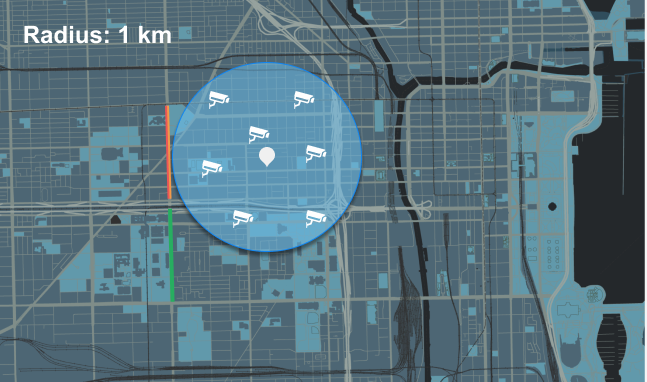
Select all cameras within a specified radius of the event location.
This option helps focus your monitoring efforts by automatically sharing live video from cameras near the event location.
A map showing a 1 km radius around a pin along with seven camera icons within the radius.
CAUTION:
The trigger event must have a location, otherwise, the Share entities action is ignored.

Referencing entities associated with the source entity

For certain action types, contextualization does not stop at the source entity. If an action type requires a different entity type than the source entity, the action can be applied to the entities associated with the source entity, provided their entity type matches what the action requires.

Let's consider the following example:
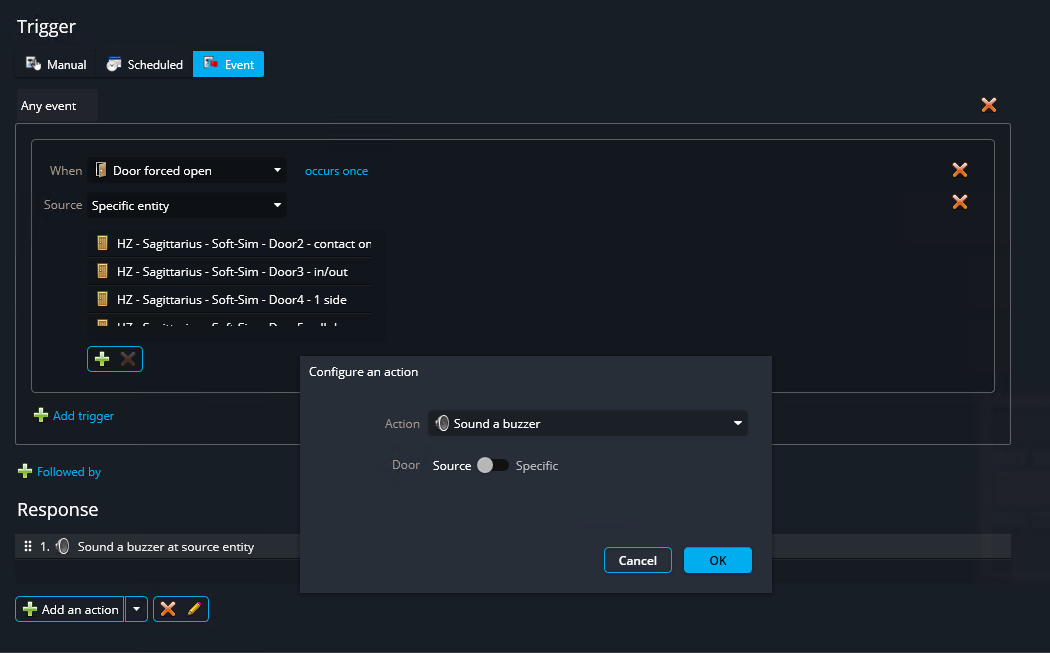
Automation based on "Door forced open" event triggering response on cameras.
The automation is triggered by the Door forced open event. The source of such an event is a door entity. We have two response actions:
  • Sound a buzzer on source entity
  • Add a bookmark on source entity
The first action, Sound a buzzer, requires a door entity as an argument. Since it is configured on the source entity, the action will sound the buzzer on whatever door raises the Door forced open event.

The second action, Add a bookmark, requires a camera entity as an argument. It is also configured on the source entity, which must be a door. In this case, the action will be applied to the camera entities associated with the door. If two cameras are associated with the source entity, a bookmark will be added to both cameras.

If you configure an action on the source entity, and the action type requires an entity type that cannot be matched to the source entity or any of its associated entities, you will receive a warning message, as shown in the following example:
Automation response with a warning and showing the tooltip.

Referencing the event data

The following actions can reference the event data as variables in their text arguments:
  • Add a bookmark
  • Send a message
  • Send an email
  • Email a report
  • Email snapshots

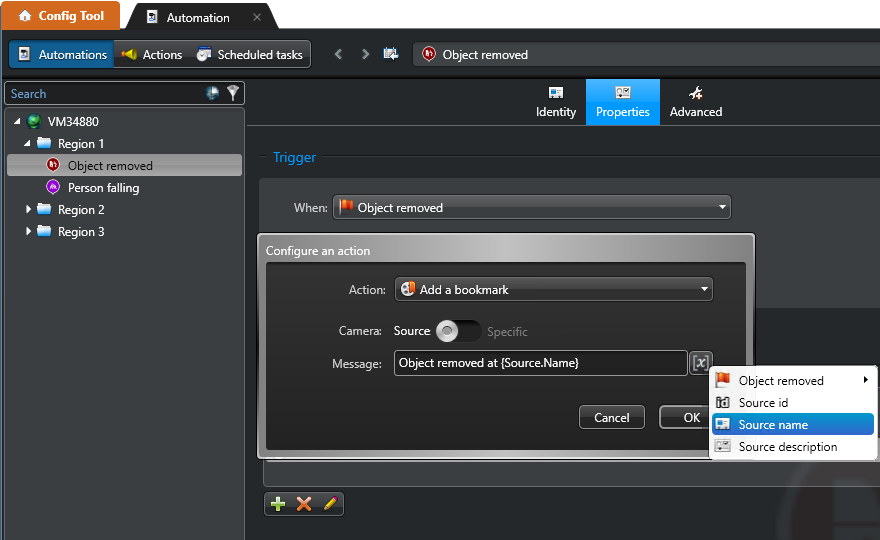
The arguments where variables can be used are followed by the Variable x. button.

The Automations page showing a contextualized action configured to use the source entity's name in a bookmark message.
To include a variable in a text field, place your cursor where you want the variable to be inserted, click the Variable x. button, and then select the variable you want. The position of the variable in the text is indicated by curly brackets: {VariableName}. The most common ones are:
  • {Source.Id}: The unique identifier (GUID) of the source entity.
  • {Source.Name}: The name of the source entity.
  • {Source.Description}: The description of the source entity.
  • {EventDescription}: The message that accompanies the event. The included data varies depending on the event type.
CAUTION:
A triggering event is required to run contextualized actions. When you manually trigger an automation that has contextualized actions, the behavior can be unpredictable. When you run an automation in the response of another automation, the context of the calling automation is also the context of the called automation.