
Scenario: Responding to a fire using threat levels
2026-09-02Last updated
In case of a fire, threat levels can be used to facilitate evacuation and response by triggering actions to sound a fire alarm, unlock doors, and bookmark camera recordings.
Note:
This example is for illustration purposes only. We are not suggesting that Security Center
SaaS is a life-safety tool.
In this scenario, a threat level for responding to a fire could be configured as follows:
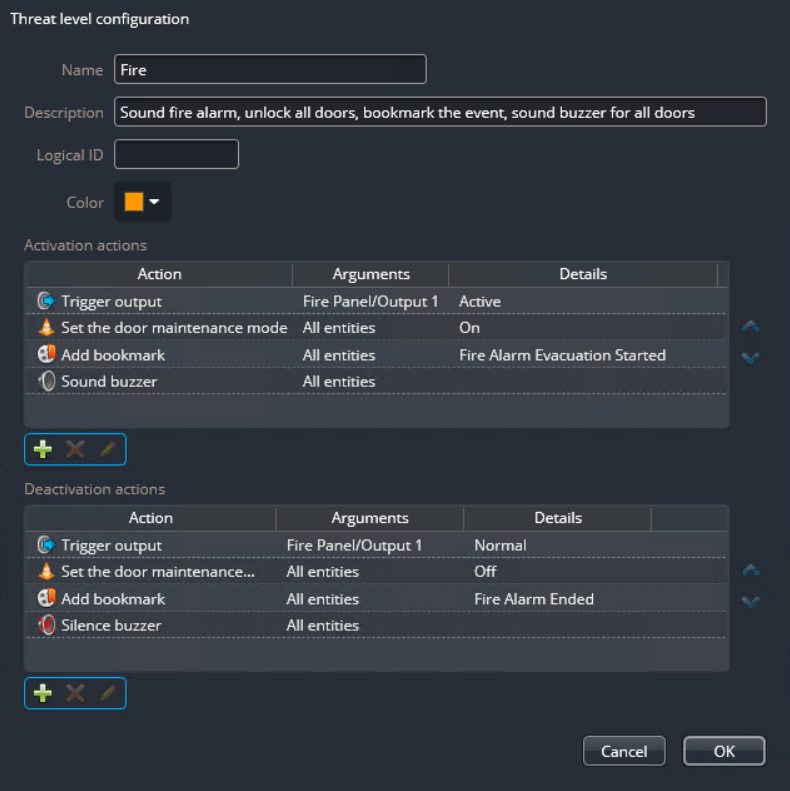
When an operator sets this threat level in an area, the system performs the following actions:
- Sets the "Fire Panel/Output 1" output to Active. This sounds the fire alarm, assuming this is where the alarm bell is connected.
- Sets all doors within the area is set to maintenance mode, effectively unlocking all of them for an indefinite period of time. This is better than using the Unlock door explicitly action which only unlocks the doors for a few seconds.
- Adds a "Fire Alarm Evacuation Started" bookmark to a camera recording.
- Sounds the buzzer output defined for all doors within the area and sets the output to Active.
When an operator clears this threat level, the system performs the following actions:
- Sets the "Fire Panel/Output 1" output behavior to Normal. This stops the fire alarm.
- Turns off the maintenance mode on all doors within the area. This restores all doors to their normal behavior.
- Adds a "Fire Alarm Ended" bookmark to a camera recording.
- Silences the buzzer output defined for all doors within the area and sets the output to Normal.