
Scenario: Responding to a gunman using threat levels
2026-09-02Last updated
If a gunman or shooter is spotted, threat levels can be used to block access to areas, trigger alarms, and bookmark camera recordings.
In this scenario, a threat level for responding to a gunman could be configured as follows:
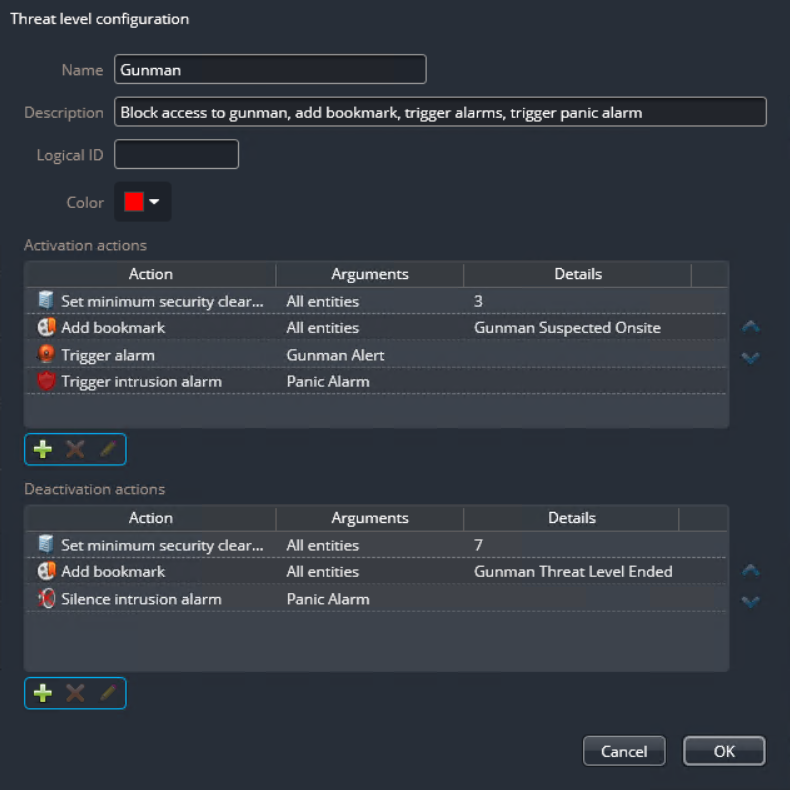
When an operator sets this threat level in an area, the system performs the following actions:
- Sets a minimum security clearance. This reduces the mobility of the gunman, assuming the
credential he holds has a security clearance lower than 3.
This configuration assumes that only armed security personnel have a clearance level higher than 3 (between 0-3), and that security operators continue to monitor all doors so they can open them when necessary to allow bystanders to hide in secured areas that the gunman cannot access.
- Adds a bookmark called "Gunman Suspected Onsite" to all cameras recording within the area.
- Triggers an alarm called "Gunman Alert".
- Triggers a physical alarm called "Panic Alarm" on an intrusion detection area.
When an operator clears this threat level, the system performs the following actions:
- Restores normal access to all cardholders by setting the security clearance to the lowest level (7).
- Adds a bookmark called "Gunman Threat Level Ended" to all cameras recording within the area.
- Silences the "Panic Alarm" alarm on the selected intrusion detection area and the siren on the intrusion panel stops beeping. Depending on your intrusion panel and the type of alarm, this action might also acknowledge the alarm.