2026-09-23Last updated
To use your i-PRO direct-to-cloud (D2C) camera for video monitoring and recording in
Security Center SaaS, you must configure the camera before adding it to your system.
Before you begin
- Update your camera to the latest compatible firmware.
- Download the D2C for Genetec Security Center SaaS extension package from
i-PRO.
- Ensure that the device has internet connectivity and
that it can reach the required endpoint
domains.
- If the camera has been activated on another Security Center SaaS system, reset the
camera to factory default settings.
Procedure
-
Connect to the camera's web page and sign in.
-
Ensure that the camera's date and time are synchronized with either a Network Time
Protocol (NTP) server or with your PC.
- To synchronize with an NTP server
- In , click Synchronization with NTP server.
- To synchronize with your PC
- In , click Set PC time to the camera.
-
Select a time zone in .
-
If daylight saving time applies, set Summer time (daylight
saving) to Auto.
-
In , click Uninstall on any unwanted extension packages.
Note: You must remove the D2C for Genetec Security Center SaaS package.
-
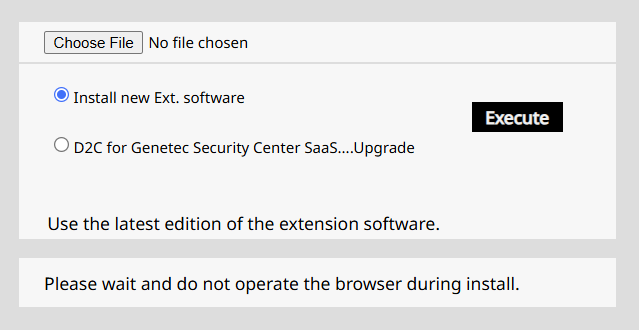
Install the D2C for Genetec Security Center SaaS extension package:
-
Click Choose file and select the package.
-
Select Install new Ext. software, click
Execute, and click OK.
-
Click .
-
Take note of the serial number and client secret in the SC SaaS enrollment
information window, which are required to add the camera to Security Center
SaaS.
-
Click Go to Security Center SaaS and sign in.
-
From the Devices page in the Configuration
task, click Add device, and follow the steps in the configuration
wizard.
The camera is added to the device list and becomes available
after a few seconds.