2025-12-19Last updated
To review and manage shared video clips, including recipient access and permissions,
end users can use the Manage video clips dialog in Security Center
SaaS.
What you should know
The user sharing video clips is responsible for managing their shared video files.
Viewing
shared video clips scenarios:
- Scenario 1: Someone outside the security control room who does not have access to the SC
SaaS system might need access to video. For example, law enforcement officers, district
attorneys, regions that can submit Subject Access Requests, or members of the public.
- Scenario 2: Teams internal to the organization that own the security system might need
access to video, but do not have access to Security Center SaaS. For example, marketing,
legal, HR teams, and so on.
Procedure
-
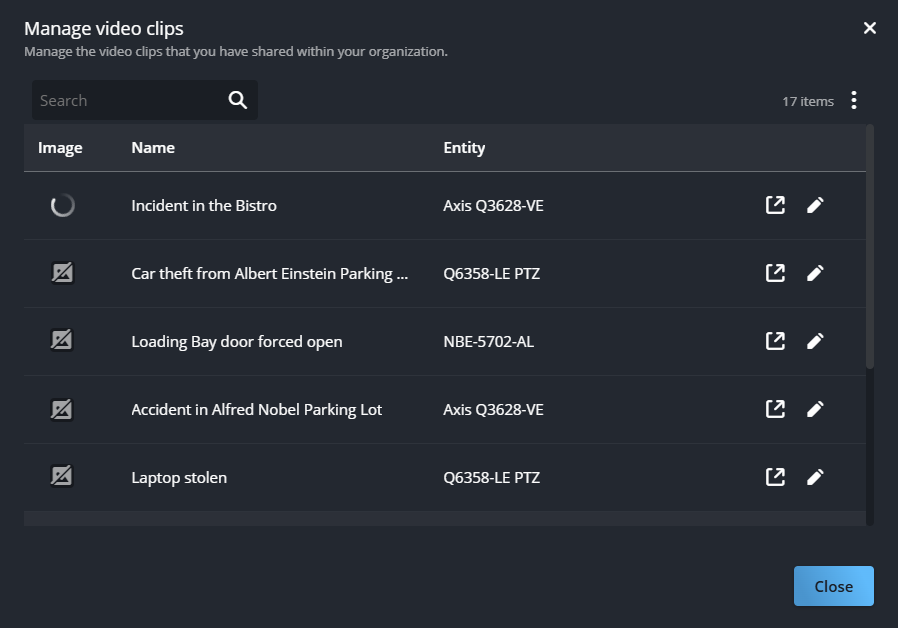
In Genetec Operation web, click the account username and click Manage video
clips.
-
(Optional) In the Manage video clips dialog, click Show
more (
)
and select Column options to set the order and visibility of
columns.
-
Select or clear the checkboxes to show or hide columns as required.
-
Click and drag Reorder (
) next to the column names to set your preferred order.
-
Click Apply.
-
If the list is long, search for the video clip you require.
-
Click View video clip (
) to review the video contents that you shared with recipients.
Reviewing the clip in Genetec Clearance™ lets you see what the recipients see and
verify that you shared the right video clip with the correct recipients and the
appropriate permission levels.
-
Click
Edit access (
) to
review or change access.
-
If any recipients are missing, enter their name or email address and click the
recipient to add them.
-
In the drop-down next to each recipient, select the appropriate access from the
following:
- View
- View and download
- Edit
- Manage
Note: Access changes performed in Operation web update the shared video clip
permissions in Clearance.
For more information, see
Permission Levels in Clearance.
-
Click Save to confirm your changes.
-
Click Close to exit the dialog.