Adding quick actions to map objects

2026-03-27Last updated

You can add a quick action to any map object represented by an icon, allowing operators to trigger it with a double-click.

Before you begin

You must have map objects configured. For more information, see Adding map objects.

What you should know

  • You cannot associate quick actions to map objects represented by shapes, images, or text. Map objects linked to federated entities are also excluded.
  • The double-click action configured in the Map designer task overrides the value set in Options > Map > On double-click in Operation desktop.
  • A Configuration desktop user without the required privilege for an action can still see the action icon and tool tip. However, the Double-click action widget is read only.
  • An Operation desktop user without the required privilege for an action sees a normal map icon and can't double-click it to trigger the action.

Procedure

  1. From the Configuration desktop homepage, open the Map designer task.
  2. Select a recent map or click Browse all maps to open an existing map.
    The selected map fills the Map designer workspace.
  3. Select an entity on your map, for example a door or a camera.
  4. Click Configure an action in the right panel.
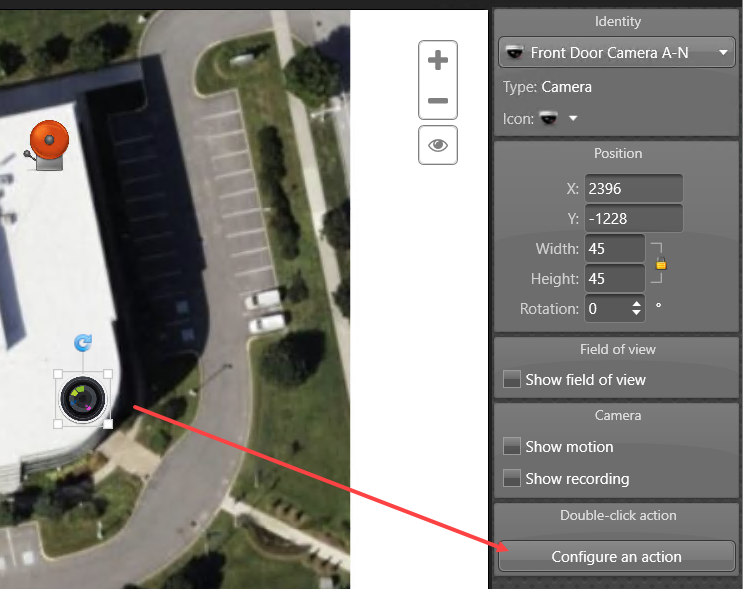
    The Configure an action button in the Map designer.
  5. In the Double-click configuration window, configure the action.
    1. Select an action from the Action list.
    2. Complete the rest of the configuration steps.
      These steps vary, depending on the action you choose. For example, if you select Trigger an alarm, you select an alarm to trigger from the Alarm list.
    3. Click OK.
  6. In the Map designer toolbar, click Save ().
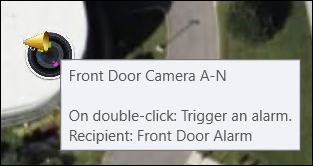
  • In Configuration and Operation desktop, the map icon now includes a superimposed action icon and the configured action is displayed in a tool tip.
  • In Operation desktop, an operator with sufficient privileges can double-click the icon to trigger the configured action.
The megaphone icon and tool tip displayed for map double-click actions.