Viewing the visit events schedule

2026-02-13Last updated

To see what visit events are planned, you can view the visit events schedule. Using this information, you can see what visitors are expected today or in the coming week and prepare any access cards or other special requirements ahead of time.

Before you begin

To view the visit events schedule in the Front desk task, you must be assigned the Front desk role.

Procedure

  1. In Security Center SaaS, open the Front desk task.
  2. Click View schedule.
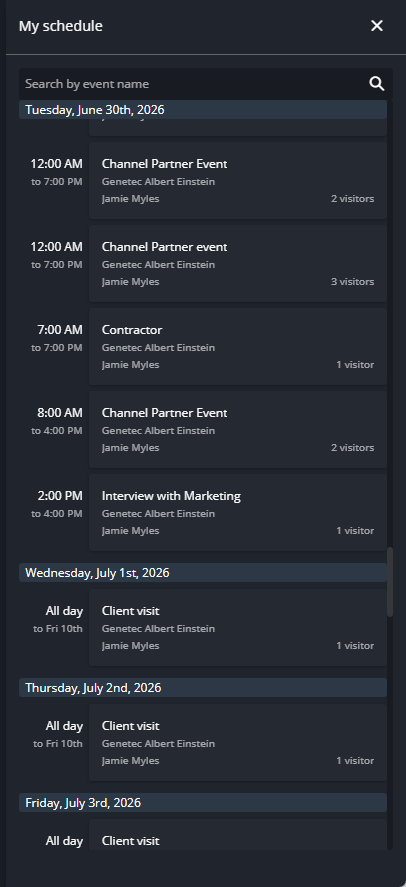
    The My schedule pane in Front desk showing the visit event shedule.
  3. In the My schedule dialog box, click an event to display an overview of the event and the visitors invited to the event.
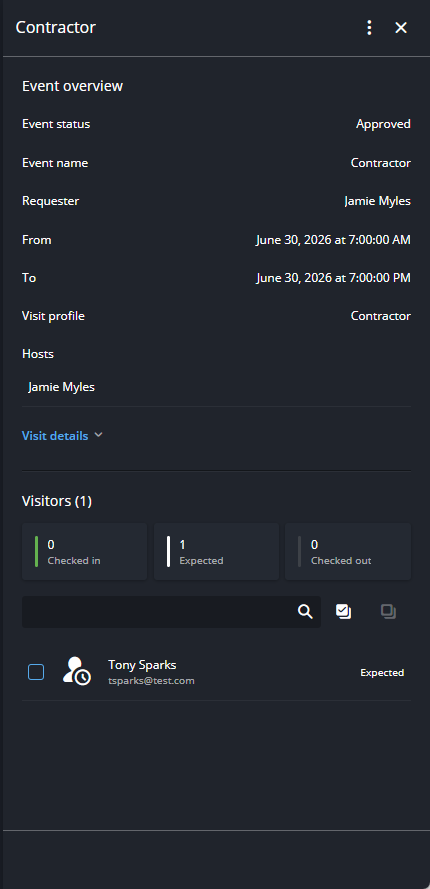
    The visit event details pane in Front desk showing additional information in the visit Overview tab and Visitors tab.

After you finish

Depending on the event and number of attendees, you can prepare any access cards or other special requirements ahead of time.