2026-07-24Last updated
To set custom time constraints for situations that occur weekly, you can define weekly
schedules and apply them to entities in Genetec™ Configuration desktop.
Procedure
-
Open the System task and click the Schedules view.
-
Click Schedule (
 ), type a
name for the schedule, and press Enter.
), type a
name for the schedule, and press Enter.
-
In the Identity tab, enter basic properties of the schedule, and then
click Apply.
-
Click the Properties tab.
-
From the Date coverage drop-down list, select
Weekly.
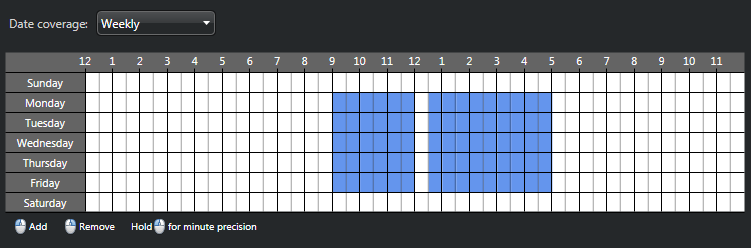
Time ranges are shown as colored blocks on a time grid in 15-minute blocks. You can
hover over a block to see its start time.
-
Using the time grid, set the time coverage as follows:
- To select blocks of time, left-click your mouse.
- To remove blocks of time, right-click your mouse.
- To select or remove a successive block of time, click and drag your
mouse.
- To select or remove all blocks of time in one day, click the name of the
day.
- To select or remove a block of time for all days of the week, click the timeline
at the top of the time grid.
- To zoom in on the time grid and select or remove specific minutes, click and
hold your left mouse button.
-
Click Apply.
Example
The following example shows a weekly schedule from 9:00 am to 5:00 pm, from Monday to
Friday, with a half-hour break between 12:00 pm and 12:30 pm.