2026-09-23Last updated
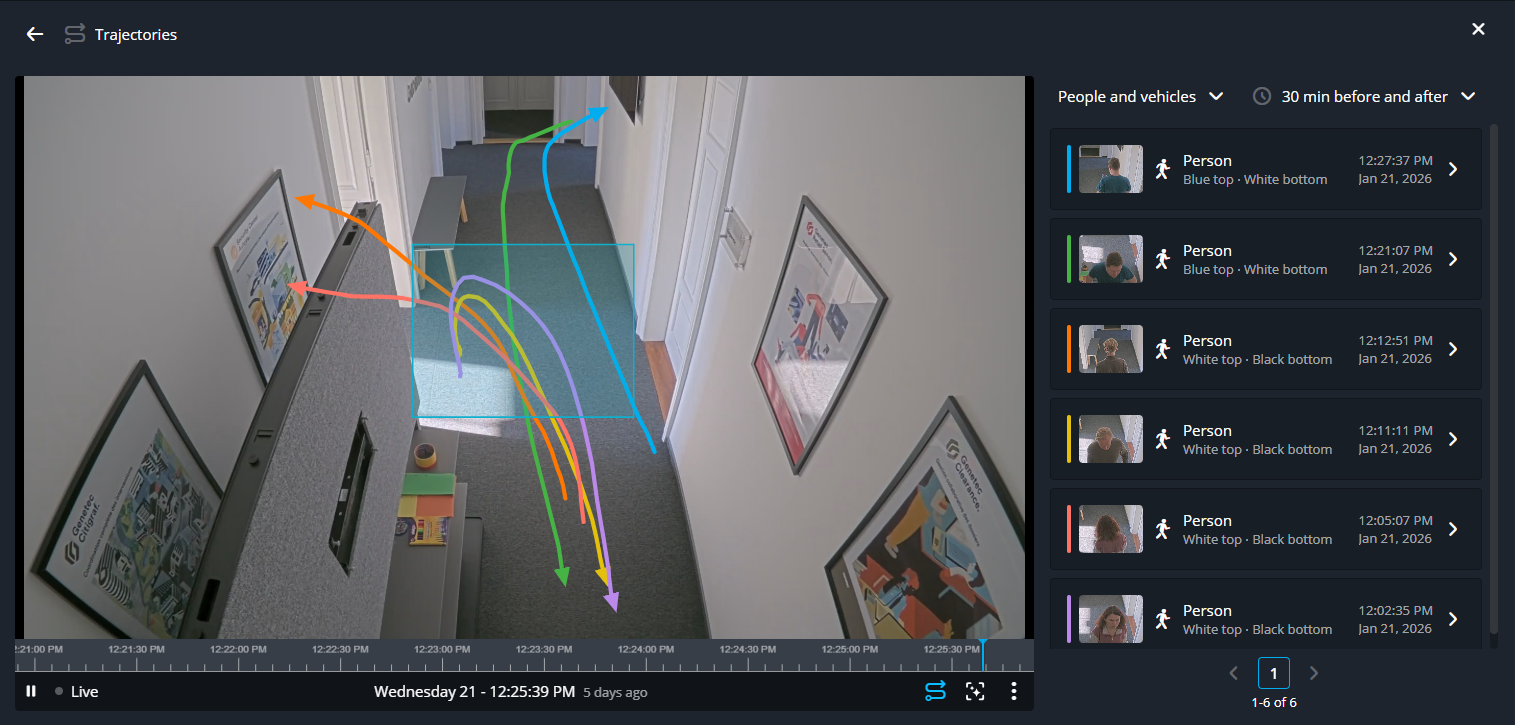
Using visual trajectory search, you can observe how people and vehicles moved through a
specified area within a camera's field of view.
What you should know
This procedure requires a Security Center SaaS Premium Plan. For an overview of the key features and differences between the
Standard and Premium plans, see the Security Center SaaS Features Matrix.
Procedure
-
In a video tile, go to a point of interest in the timeline.
-
In the video player toolbar, click Intelligent search (
 ).
).
-
Click and draw a box around an area of interest and click Show
trajectories.
The results are displayed to the right of the video tile.
-
Use the object and time filters to refine your search results.
-
Hover over the results to display objects and their trajectories in the video
tile.
-
Click a result to view the video of the object.
-
(Optional) Review the Similar people section to see other
individuals who were nearby during the time frame specified by the filter.
-
(Optional) Review the Nearby activity section to see the people or
vehicles that were in the area during the time range specified by the filter.
-
(Optional) Adjust the criteria and review other areas of interest.