2026-08-26Last updated
To detect people and vehicles for investigations, you can configure the metadata stream
on your Bosch camera.
Procedure
-
Using a web browser, connect to the camera and sign in.
-
Click and install the necessary licenses:
-
Restart the camera.
-
Click , then click Configure in Bosch Configuration Manager.
-
Right-click on your camera, select Set session
authentication..., and then enter camera credentials.
-
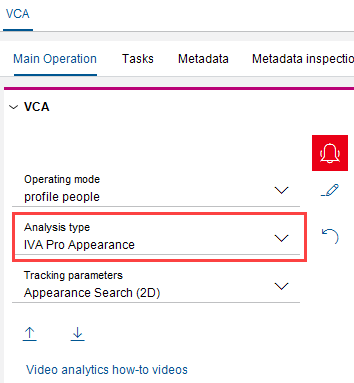
Select an analysis type:
- IVA Pro Appearance to detect people.
- IVA Pro Perimeter to detect vehicles.
After you finish
If you configured the camera for investigation after adding it
to Security Center SaaS, manually synchronize the
camera to access the new features.
